
Google Has Been Calling Your Business — Now You Can See Exactly What It Learned

If your business has a Google Business Profile, Google may already be calling you to check your details.
Here’s something that surprises a lot of business owners the first time they hear it: Google sometimes contacts businesses directly — by phone call, text message, or even WhatsApp — using an automated assistant, just to confirm basic details like whether you offer parking, accept walk-ins, or do curbside pickup. Whatever gets said in that conversation can then quietly become part of your public Business Profile.
Until recently, there was no way to see what Google had actually recorded from those calls. That’s finally changed.
What Google Just Rolled Out
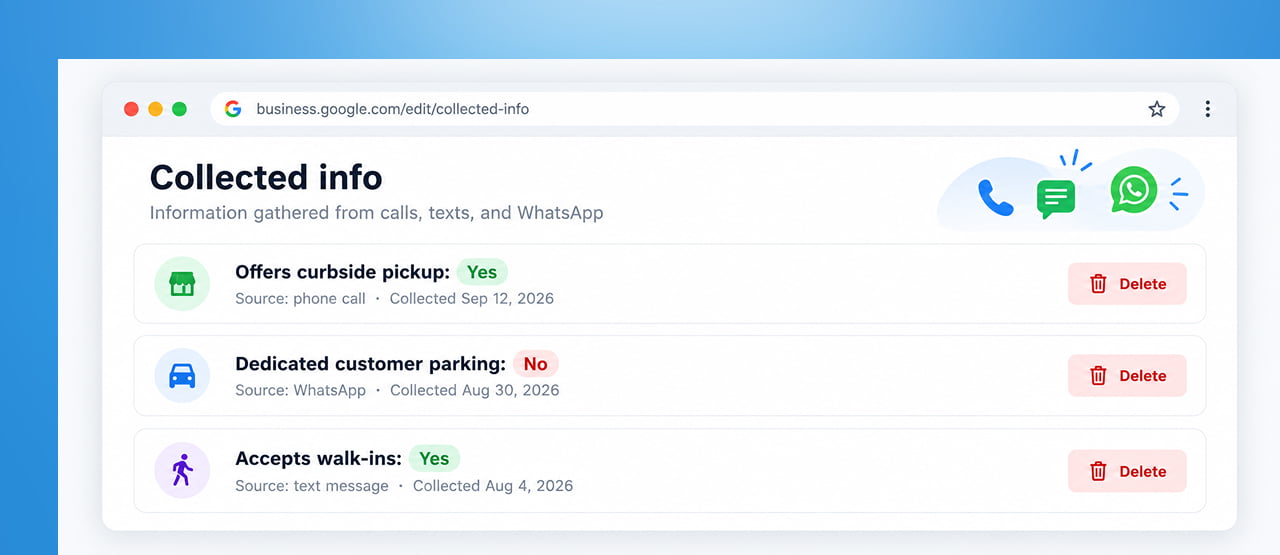
Google has begun rolling out a new tab inside Google Business Profile called Collected Info. According to Google’s own Help Center documentation, the feature lets business owners review information gathered through these automated interactions — and delete anything that’s outdated or wrong.
Here’s exactly how Google describes the reasoning: to confirm your business details and keep your Business Profile updated and discoverable, Google may occasionally reach out using automated messages, and any information you provide in response can be used to update your profile.
How to Actually Find and Use It
If the feature is live on your account, here’s where it lives: go to your Business Profile, select Edit profile, then Collected info. From there, you can review each entry — which shows its source and the date it was collected — and select Delete on anything you want removed from Google’s records.
One detail worth knowing: the information displays in whatever language it was originally provided in, which matters if your business operates across regions or if a call was handled by different staff members over time.
The One Catch You Need to Understand
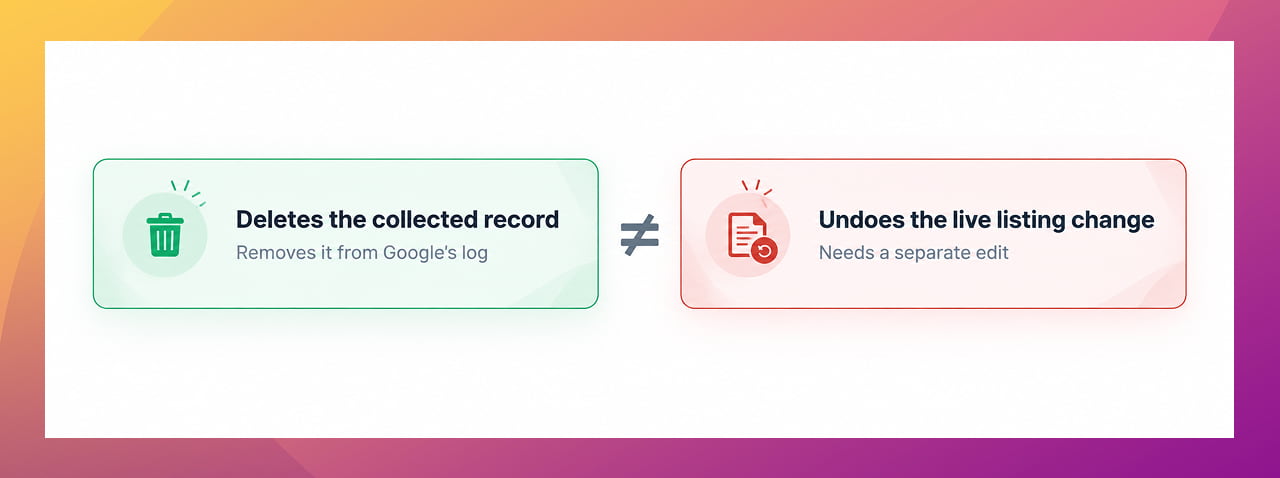
This is the part that’s easy to misread, so it’s worth being precise: deleting a collected entry does not automatically undo a change that’s already been made to your public listing. Google’s own guidance draws a clear line between the two — removing the collected record and correcting what’s actually showing on your profile are two separate actions.
If a piece of misinformation from one of these calls already made it onto your live listing, deleting the “collected” version doesn’t fix the listing itself. You’ll still need to go in and correct that separately through your profile’s normal editing tools.
Think of Collected Info as a history log, not an undo button. It tells you what happened and where a piece of information came from — it doesn’t automatically reverse the downstream effect.
Why This Matters More Than It Sounds
For any business that depends on accurate local information — hours, services, accessibility features, parking — this closes a real gap that’s existed for a while:
- You finally get visibility into a process that was previously invisible. Information could be added to your profile based on a phone conversation, and you’d have no record of when it happened or what was actually said.
- It catches miscommunication before it becomes a bigger problem. If a staff member gave an inaccurate answer to an automated call — even innocently — you now have a way to spot and correct it rather than discovering it weeks later from a confused customer.
- It’s especially relevant for businesses with high staff turnover or multiple people answering calls, where the person picking up an automated verification call might not always give a fully accurate answer on the spot.
Availability Is Still Limited — Don’t Assume It’s Missing
Google has been explicit that this feature is currently available only for select regions, languages, and business categories, and it’s still rolling out gradually. If you check your profile and don’t see a Collected Info option under Edit profile yet, that doesn’t mean anything is broken — it likely just hasn’t reached your account or category yet.
What To Do About This Right Now
- Check your Business Profile for the Collected Info tab under Edit profile, and make a habit of glancing at it periodically once it appears.
- Brief whoever answers your business phone that Google may occasionally call using an automated system to verify details — and that what they say in that call can end up published publicly.
- If you spot something wrong in Collected Info, delete the entry — then separately check your live listing to confirm whether the same wrong detail needs fixing there too.
- Treat this as one more reason to check your Business Profile regularly, not a replacement for doing so. Automated verification calls are just one of several ways your listing can change without you actively doing anything.
Quick Takeaways
- Google’s new Collected Info tab in Business Profile lets you see what its automated calls, texts, and WhatsApp messages have gathered about your business — and delete outdated entries.
- Each entry shows its source and collection date, displayed in the language it was originally given in.
- Deleting a collected entry removes it from Google’s records but does not automatically undo a change already made to your public listing — those are two separate steps.
- The feature is still rolling out gradually and is currently limited to select regions, languages, and business categories.
- This is a good moment to brief staff that automated verification calls from Google are real, and that answers given can become public information.
Want Help Keeping Your Business Profile Accurate Across Every Channel?
Between automated verification calls, user-submitted edits, and your own updates, a lot can change on your listing without anyone noticing right away. Reach out through our contact form and we’ll help you build a simple routine for keeping it accurate.


 +91 8277203000
