
Conversion Rate Optimization (CRO) Basics: Small Site Changes, Big Lift

Most businesses spend real money to get people onto their website — ranking higher on Google, running ads, posting on social media. Then, without even realizing it, they lose most of those visitors the moment they arrive.
Think of your website like a physical shop. You pay for a good location and an eye-catching storefront. But if the inside is confusing, the checkout line is too long, or no one’s around to answer a question, most people walk right back out without buying anything.
That’s exactly what happens on websites every day — you just can’t see it happening. Nobody sees the visitor who almost bought something and then quietly closed the tab.
Fixing that gap isn’t about getting more visitors — you’re already paying for the ones you have. It’s called conversion rate optimization (CRO), and it just means making small changes to your website so more of your existing visitors actually do what you want: buy something, fill out a form, or call you.
The good news:
- Closing this gap almost never needs a full website rebuild.
- It usually takes a handful of small, deliberate tweaks — like moving a sign, shortening a queue, or placing a staff member closer to the door.
What “Conversion Rate Optimization” Actually Means
Everything else in this article builds on this one idea, so let’s start here. Conversion rate optimization, or CRO, is the process of improving a website or landing page so that a greater percentage of visitors complete a desired action.
Your conversion rate is simply the percentage of website visitors who take the specific action you want them to take. That action is called a conversion — it could be buying a product, filling a contact form, subscribing to a newsletter, or booking a call.
A quick example: If 100 people visit your site in a day and 2 of them fill out your contact form, your conversion rate for that day is 2%.
Those 2 people are called leads — potential customers who’ve shown real interest, even though they haven’t paid you anything yet. Turning a visitor into a lead, and eventually into a paying customer, is the whole point of having a website.
So is 2% good or bad? According to HubSpot, the average conversion rate across all businesses is around 1.7% — meaning fewer than 2 out of every 100 visitors become a lead or customer. It varies a bit by industry:
- Skincare brands: closer to 2.7%
- Luxury and furniture brands: often under 1%
The overall picture is the same almost everywhere — most visitors leave without doing anything. That’s normal, not a sign something’s badly broken. But it does mean there’s almost always room to improve.
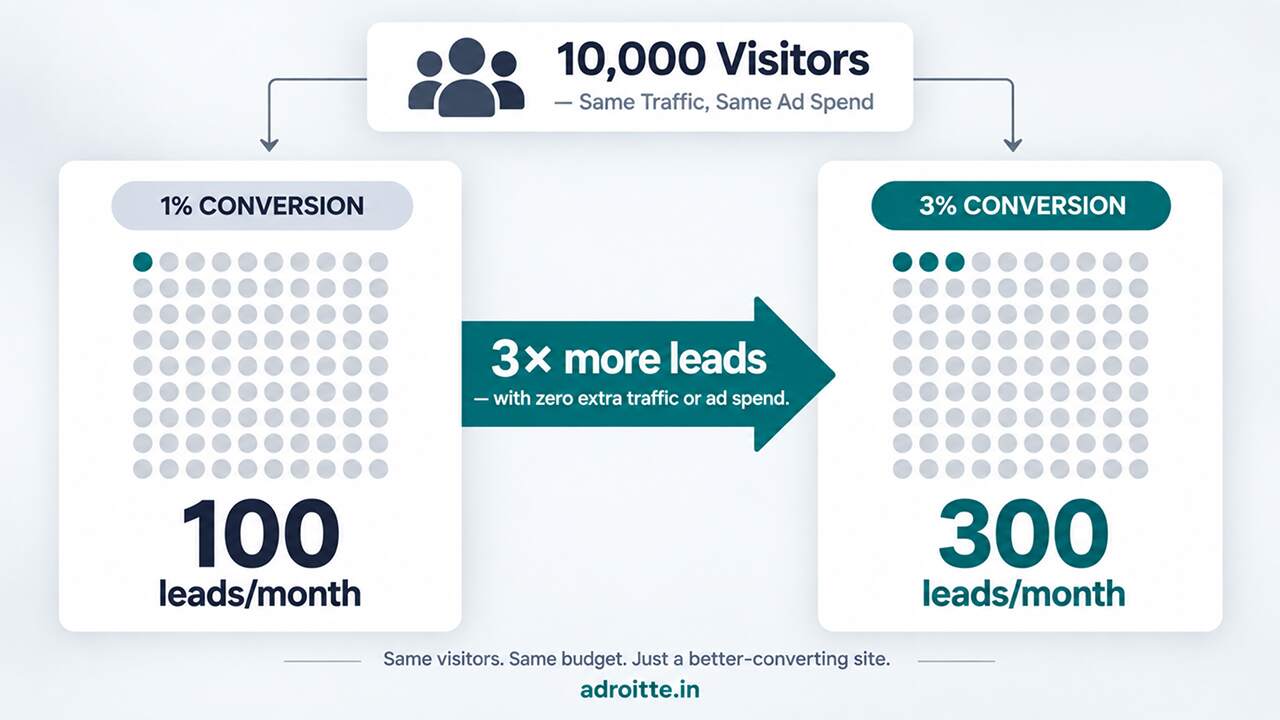
Here’s why even a small improvement matters so much — this is really the heart of conversion rate optimization. Picture a website getting 10,000 visitors a month:
- At a 1% conversion rate → 100 leads
- At a 3% conversion rate (same 10,000 visitors, no extra ad spend) → 300 leads
That’s three times as many potential customers, just from getting slightly better at converting the people already showing up.
To put a rough rupee figure on it: say 1 in 10 of those leads eventually becomes a paying customer worth ₹40,000 (roughly $500) to the business. Moving from 100 leads to 300 leads means going from 10 new customers a month to 30 — an extra ₹8,00,000 in monthly revenue, from the exact same traffic and the exact same ad budget.
That’s the whole appeal of conversion rate optimization: unlike buying more ads or chasing higher search rankings, it doesn’t cost more to get more out of the visitors you already have.
Why Even a Split Second of Loading Time Matters
If there’s one “small” change with a surprisingly big effect, it’s how fast your website loads — something most business owners never think twice about, because to them the site “loads fine.”
Why speed matters so much: people are impatient, especially on their phones. If a page takes too long to appear, visitors don’t wait around wondering if it’s still loading — they simply leave, often without even consciously deciding to. It’s closer to a reflex, the same instinct that makes you close a slow app without a second thought.
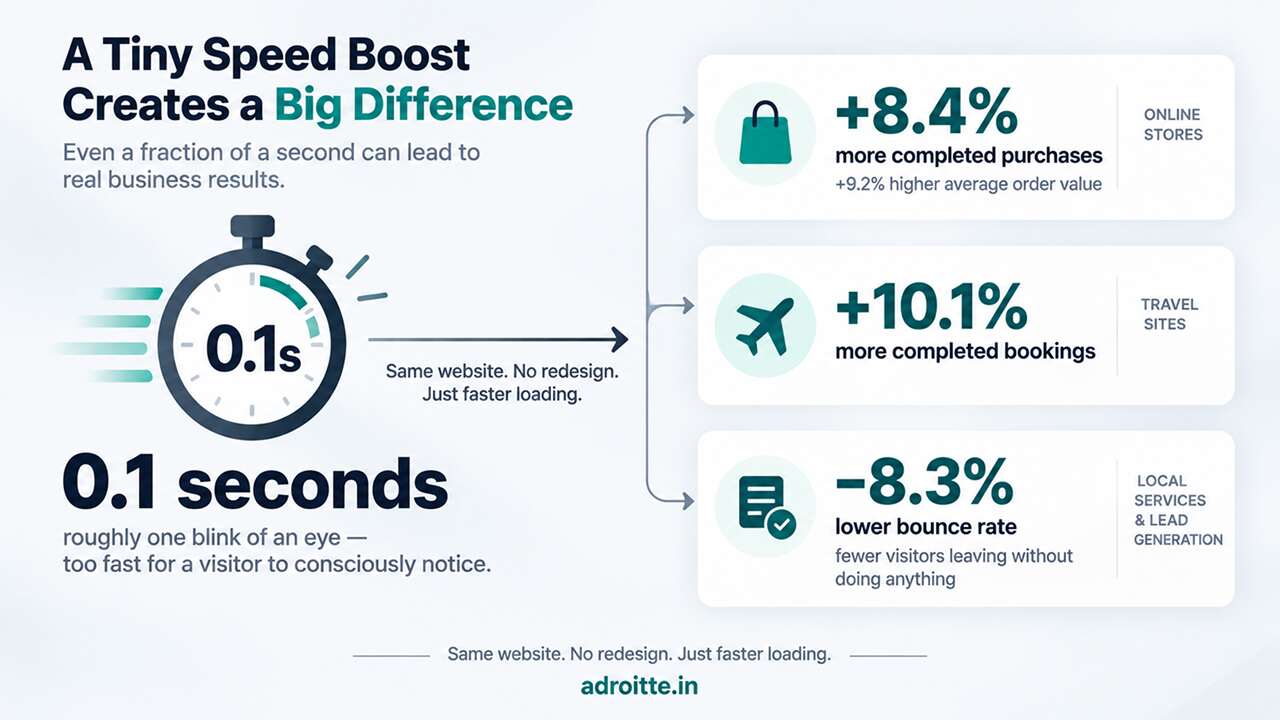
Google itself commissioned a study from Deloitte — nicknamed “Milliseconds Make Millions” — that measured what happens when a website’s mobile loading time gets just one-tenth of a second faster. (One-tenth of a second is roughly how long it takes to blink — not something you’d ever consciously notice.)
And yet, that tiny speed boost made a real difference:
- Online stores: 8.4% more visitors completed a purchase, and shoppers spent 9.2% more per order
- Travel booking sites: 10.1% more completed bookings
- Form-based businesses (local services, consultants, B2B companies): “bounce rate” dropped by 8.3%
What’s a bounce rate? It’s simply the percentage of visitors who land on a page and leave again without doing anything at all — no clicks, no scrolling, nothing. Conversion rate optimization can help businesses get more value from existing website traffic by making it easier for visitors to understand the offer and complete important actions.
None of this needs a from-scratch redesign or a big budget. It’s usually unglamorous, behind-the-scenes housekeeping — compressing oversized images, removing old unused code, and similar cleanup — the kind of work normally handled through routine page speed optimization rather than its own big project. Businesses can measure conversion rate optimization using conversion rate and other relevant metrics such as form submissions, purchases, qualified leads, CTA clicks, and revenue.
Where Businesses Usually Leave Easy Wins on the Table
Beyond speed, a few specific things tend to make the biggest difference for the least effort. Worth checking these before considering anything bigger:
Where you put your “click here” links
Any button or link asking a visitor to do something — “Call now,” “Get a quote,” “Sign up” — is called a call-to-action (CTA). Most businesses assume that as long as a CTA exists somewhere on the page, people will use it.
HubSpot tested this and found something worth knowing:
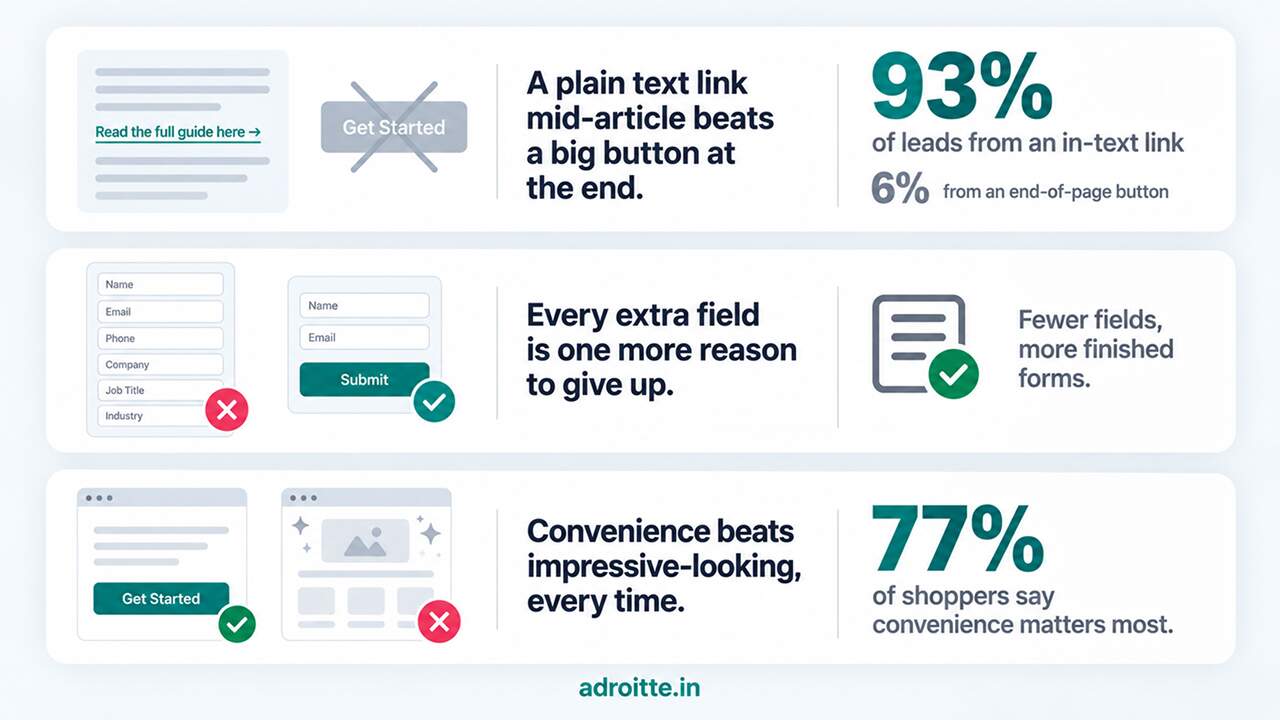
- A plain text link woven naturally into an article — like “get in touch to learn more,” written mid-paragraph — generated up to 93% of that page’s leads.
- A big banner button placed at the very end of the same article generated only 6%.
So simply having a CTA isn’t enough — where and how it’s presented changes almost everything about whether anyone clicks it.
Long or confusing forms
Picture filling out a form on your phone: name, email, phone number, company name, job title, “how did you hear about us,” a budget dropdown, and a big empty box asking you to “tell us about your project.”
Most people give up halfway through. Every extra field is one more small reason to abandon the form and leave. Cutting a form down to the essentials — usually just name, email, and a short note — is one of the cheapest changes a business can make, and it consistently increases how many people actually submit it.
Simplicity over flashiness
It’s tempting to assume customers want the flashiest-looking website — big animations, elaborate design, lots of visual polish. But HubSpot’s research found that 77% of shoppers say convenience matters more to them than almost anything else when deciding whether to buy.
In practice, a plain, fast, easy-to-use page that clearly tells someone what to do next usually beats a fancier one that’s slower or more confusing to navigate — even if the fancier one “looks” more professional at first glance.
Test Small Changes Instead of Redoing Everything at Once
The most common mistake businesses make is treating conversion rate optimization like one big redesign project instead of an ongoing habit — rebuilding the entire website at once and just hoping the new version performs better.
The problem: it’s slow, expensive, and genuinely risky. When you change everything at once — colors, layout, wording, images, forms — and results change afterward, there’s no way to know which specific change actually caused it.
The safer approach: change one thing at a time. For example:
- Change only the wording on your main button — from “Submit” to “Get My Free Quote”
- Leave everything else exactly as it was
- Track what happens using tools like Google Analytics, usually set up as part of a proper digital marketing services plan
- If the numbers improve, keep the change. If not, try something else.
This approach — testing one change at a time and measuring the result — is called A/B testing. It’s the standard, low-risk way experienced marketers make improvements without gambling on a big, expensive redesign.
Some conversion rate optimization improvements can involve relatively small changes to CTAs, forms, copy, layouts, or other website elements. Larger design or technical problems may require more substantial changes.
That measuring step is the part most businesses skip entirely. Without analytics in place, and without a way to track when someone actually converts, you’re essentially guessing whether a change helped — and small wins can happen right under your nose and go completely unnoticed.
Conversion rate optimization is generally an ongoing process. Businesses can identify opportunities, implement changes, test results, and continue refining the website based on the data.
Getting more visitors to a website does not automatically mean getting more customers or leads. If visitors cannot quickly understand the offer, find important information, trust the business, or complete the desired action, additional traffic may produce limited business value. Conversion rate optimization addresses this gap by improving the experience for the visitors who are already reaching the website.
Ready to Find Your Site’s Quickest Wins?
You don’t need to rebuild your entire website to see a real improvement in results. You need to know which small changes are actually worth making for your specific site, and you need a reliable way to measure whether they’re working once you make them. Conversion rate optimization is not a one-time activity. Regular website maintenance can help ensure that forms, CTAs, analytics, links, and other conversion elements continue to work correctly after optimization changes are implemented.
Reach out through our contact form and we’ll get back to you promptly. We’ll take a look at your site’s speed, your buttons and links, and your forms, get proper tracking in place so you can actually see what’s working, and help you find your quickest wins — before you spend another dollar trying to bring in more traffic.


 +91 8277203000
